Appearance
ccbi 转 ccb:老项目迁移到 Cocos Creator 完整教程
老项目用 CocosBuilder 创建了 .ccbi 文件,Cocos Creator 不再支持该格式,需要先把 ccbi 转换成 ccb,再导入 Cocos Creator。
第一步:ccbi 转换为 ccb
下载转换工具: ccbi2ccb.zip
- 解压工具到任意目录
- 将
.ccbi文件(保持原始目录结构)复制到工具所在目录 - 运行工具,它会自动遍历所有子目录下的
.ccbi文件并转换为.ccb
为什么要保持目录结构? ccbi 内部记录了相对路径来引用图片资源。保持目录结构不变,转换后的 ccb 才能正确引用原来的资源。
第二步:准备 .ccbproj 文件
导入前需要一个 .ccbproj 项目文件。如果原项目没有,手动创建一个(文件名随意,后缀 .ccbproj),内容如下:
xml
<?xml version="1.0" encoding="UTF-8"?>
<!DOCTYPE plist PUBLIC "-//Apple//DTD PLIST 1.0//EN" "http://www.apple.com/DTDs/PropertyList-1.0.dtd">
<plist version="1.0">
    <dict>
        <key>deviceOrientationLandscapeLeft</key>
        <true/>
        <key>deviceOrientationLandscapeRight</key>
        <true/>
        <key>deviceOrientationPortrait</key>
        <false/>
        <key>deviceOrientationUpsideDown</key>
        <false/>
        <key>exporter</key>
        <string>ccbi</string>
        <key>fileType</key>
        <string>CocosBuilderProject</string>
        <key>fileVersion</key>
        <integer>1</integer>
        <key>flattenPaths</key>
        <false/>
        <key>generatedSpriteSheets</key>
        <dict/>
        <key>javascriptBased</key>
        <false/>
        <key>javascriptMainCCB</key>
        <string></string>
        <key>needRepublish</key>
        <false/>
        <key>onlyPublishCCBs</key>
        <true/>
        <key>publishDirectory</key>
        <string>Published-iOS</string>
        <key>publishDirectoryAndroid</key>
        <string>Published-Android</string>
        <key>publishDirectoryHTML5</key>
        <string>Published-HTML5</string>
        <key>publishEnabledAndroid</key>
        <false/>
        <key>publishEnabledHTML5</key>
        <false/>
        <key>publishEnablediPhone</key>
        <true/>
        <key>publishResolutionHTML5_height</key>
        <integer>320</integer>
        <key>publishResolutionHTML5_scale</key>
        <integer>1</integer>
        <key>publishResolutionHTML5_width</key>
        <integer>480</integer>
        <key>publishResolution_</key>
        <true/>
        <key>publishResolution_hd</key>
        <false/>
        <key>publishResolution_ipad</key>
        <false/>
        <key>publishResolution_ipadhd</key>
        <true/>
        <key>publishResolution_large</key>
        <true/>
        <key>publishResolution_medium</key>
        <true/>
        <key>publishResolution_small</key>
        <true/>
        <key>publishResolution_xlarge</key>
        <true/>
        <key>publishResolution_xsmall</key>
        <true/>
        <key>publishToZipFile</key>
        <false/>
        <key>resourceAutoScaleFactor</key>
        <integer>4</integer>
        <key>resourcePaths</key>
        <array>
            <dict>
                <key>path</key>
                <string>Resources</string>
            </dict>
            <dict>
                <key>path</key>
                <string>../srcres/ui</string>
            </dict>
            <dict>
                <key>path</key>
                <string>../srcres/fonts</string>
            </dict>
        </array>
    </dict>
</plist>
重点配置 resourcePaths:填入 ccbi 原来引用资源的路径(相对于 .ccbproj 文件),把对应的图片、字体资源也复制到这些目录,否则导入后会丢失图片引用。
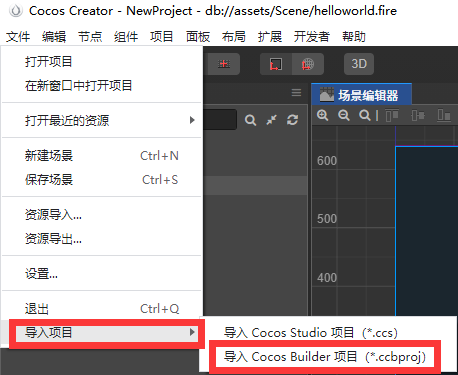
第三步:导入到 Cocos Creator
在 Cocos Creator 中导入 .ccb 文件:
常见问题
Q:转换工具运行后没有生成 .ccb 文件?
检查 .ccbi 文件是否放在工具所在目录或其子目录下,工具只处理当前目录树内的文件。
Q:导入 Cocos Creator 后图片全部丢失?
检查 .ccbproj 的 resourcePaths 配置,路径需要指向实际存放图片的目录,且要把图片文件一并复制过去。
Q:有 .pvr.ccz 格式的图集导入报错?.pvr.ccz 是 Cocos2d-x 的压缩纹理格式,Cocos Creator 不支持,需要手动解压或重新导出为 PNG/WebP。
Q:ccbi 和 ccb 有什么区别?.ccb 是 CocosBuilder 的原始项目文件(二进制格式),.ccbi 是发布后的打包文件(更小)。Cocos Creator 的导入器只认识 .ccb,所以要先还原。